Microsoft Copilot Pricing and Licensing Explained
Microsoft Copilot pricing looks straightforward until you try to buy it. There are at least seven distinct products with the word "Copilot" in the name, three billing models, prerequisite licenses that cost more than the add-on itself, and a promotional discount that expires June 30, 2026. 85% of Fortune 500 companies use some form of Microsoft AI. Most of their IT managers still can't explain the licensing to their CFO in one sentence.
After reading this guide, you'll know exactly which Copilot tier your org needs, what it actually costs per seat per year (including the base license everyone forgets), and whether the free tier covers your use case. Estimated decision time: 15 minutes with this page open.
What This Guide Covers: 1. Understand the Copilot product lineup → 2. Calculate your per-seat cost → 3. Evaluate the free tier → 4. Choose your tier → 5. Plan your rollout
Prerequisites
Before you can purchase or deploy any Microsoft Copilot product, your organization needs these foundations in place. This isn't a software install checklist. It's a procurement readiness checklist.
Put governance around how your team uses AI. The AI Acceptable Use Policy: a deploy-ready template that sets the rules for AI use.
Your purchase helps keep our hubs free to read.
-
RequiredMicrosoft Entra ID (formerly Azure AD)Microsoft's identity and login system for businesses. Every Copilot product requires users to authenticate via Entra. If your org uses M365, you already have this -- it is the system that manages your work account and single sign-on. Verify at entra.microsoft.com
-
RequiredQualifying M365 Base LicenseCopilot is an add-on, not standalone. You need one of: M365 Business Basic/Standard/Premium (SMB, up to 300 users), M365 Apps for Business/Enterprise (Office apps only), M365 E3/E5 (enterprise -- E3 covers core security and compliance, E5 adds advanced security, analytics, and voice), M365 F1/F3 (frontline worker tiers for shift-based employees), or Office 365 E3/E5 (legacy). Check licenses
-
For AgentsAzure Subscription (for agents only)Only needed for Copilot Studio / custom agents. Agent usage is metered against Azure. Not required for standard Copilot features. Create free account
-
RequiredGlobal Admin or Billing Admin RoleSomeone with this role needs to assign Copilot licenses in the M365 Admin Center after purchase.
-
RecommendedBudget Approval for Annual CommitmentEnterprise Copilot requires annual billing. Monthly billing is available for the Business tier but costs 20% more. Know your billing preference before procurement starts.
Step 1: Understand the Copilot Product Lineup
Here's the part Microsoft doesn't make easy. "Copilot" is a brand name applied to seven different products across four billing models. They share a name. They don't share a price sheet.
The Full Microsoft Copilot Pricing Map
| Product | Price | Billing | Who It's For |
|---|---|---|---|
| Copilot Chat | Free | Included with M365 | Everyone with Entra + qualifying M365 |
| Copilot Pro | $20/user/mo | Monthly | Individual M365 Personal/Family power users |
| M365 Premium | $19.99/user/mo | Monthly | Consumer bundle (apps + Copilot + 1TB + security) |
| M365 Copilot Business | $21/user/mo (annual) or $25.20/mo (monthly) $18 promo | Annual or monthly | SMBs up to 300 users |
| M365 Copilot Enterprise | $30/user/mo (annual) or $31.50/mo (annual, billed monthly) | Annual commitment | Large orgs with E3/E5/F1/F3 |
| GitHub Copilot | Free/$10/$39/$19/$39 per tier | Monthly or annual | Developers (Free/Pro/Pro+/Biz/Enterprise) |
| Security Copilot | Consumption (Security Compute Units, or SCUs) | Metered | Security teams (incl. with E5 up to 10K SCUs) |
| Copilot Studio | $200/pack/mo (25K credits) or PAYG | Capacity packs or metered | Custom agent builders |
The confusion comes from the naming. "Copilot" (free chat), "Copilot Pro" (individual), and "Microsoft 365 Copilot" (business/enterprise) are three different products at three different price points. You'll hear people say "we have Copilot" when they mean the free chat. That's not the same product as the $30/seat enterprise add-on that integrates with Word, Excel, PowerPoint, Outlook, and Teams.
The Copilot Pro / M365 Premium Distinction
For individual consumers, Microsoft launched M365 Premium at $19.99/month in October 2025, bundling the core M365 Personal/Family apps with the Copilot assistant, 1TB storage, and advanced security in a single subscription. This effectively replaced standalone Copilot Pro for personal/family consumers. Copilot Pro at $20/month still exists as an add-on for SMB and power users who already hold an M365 Personal or Family subscription, but most new individual consumers should evaluate M365 Premium first. Note that Microsoft also raised M365 Personal and Family base plan prices by $3/month to include Copilot features in standard plans. If you're reading this as an IT manager, neither Copilot Pro nor M365 Premium is what your org needs -- look at Business or Enterprise tiers below.
Promotional Pricing Alert: M365 Copilot Business at $18/user/month (down from $21) for new commercial customers through June 30, 2026. Annual commitment required, first-year pricing only. Available as both a convenience SKU (bundled with M365 Business Standard or Premium) and as a standalone add-on. Cannot be combined with other offers or applied to trial subscriptions.
The E7 Frontier Suite (Coming May 2026)
Microsoft announced the M365 E7 Frontier Suite at $99/user/month, launching May 1, 2026. "Frontier" here refers to Microsoft's term for its most advanced AI capabilities and agent governance features. E7 bundles M365 E5, M365 Copilot, and Agent 365 (a new unified control plane for managing AI agents across an organization) into a single SKU. This is the first new enterprise license tier in roughly a decade. If your org is already on E5 and adding Copilot, run the math on E7 vs. buying them separately.
Source: Microsoft 365 blog announcement, March 2026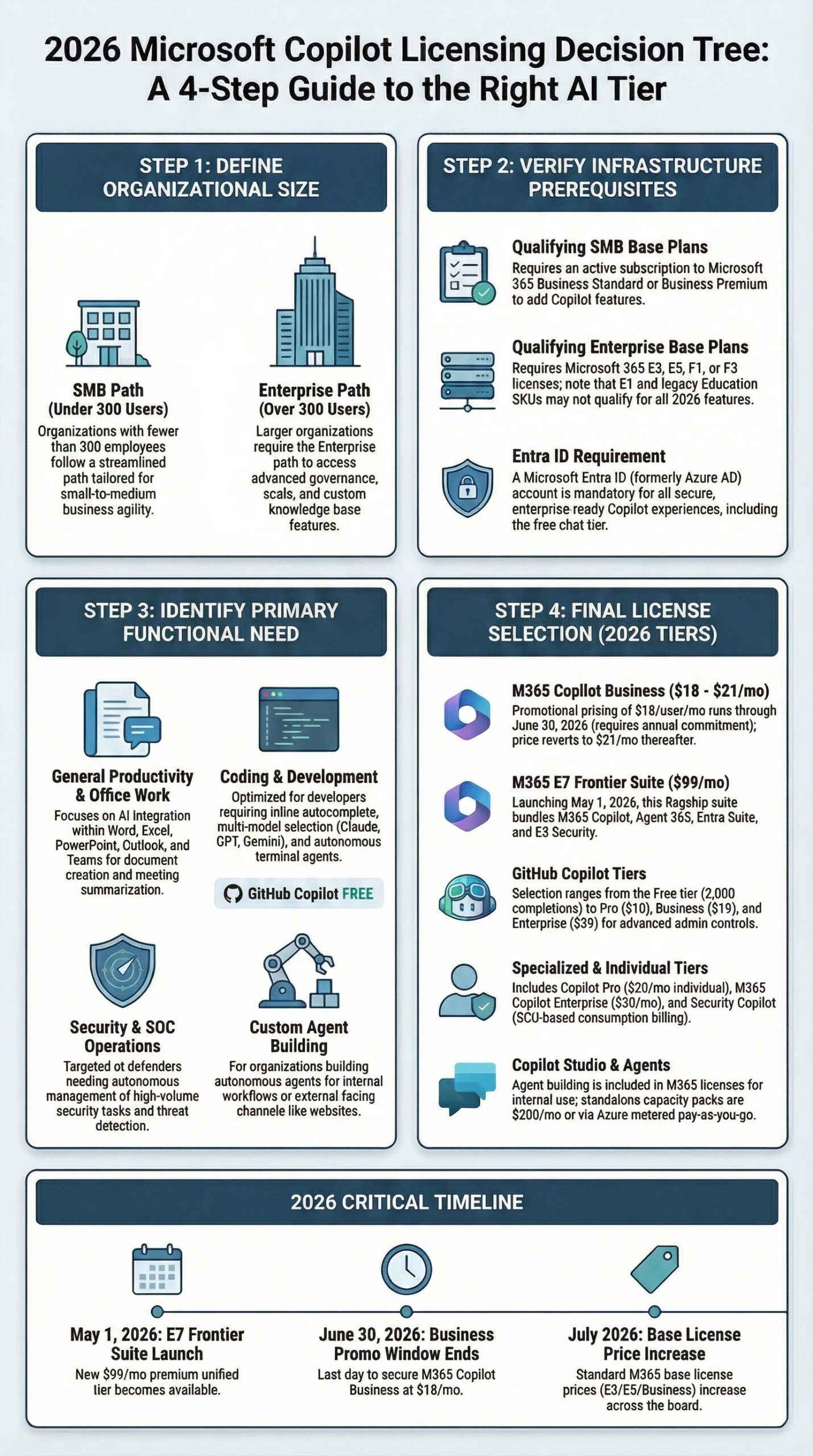
Step 2: Calculate Your Per-Seat Cost
This is where procurement meetings go sideways. The Copilot license is an add-on. You're paying it on top of your existing M365 base license. That base license costs more than Copilot itself in most cases.
Per-Seat Cost Calculator
Licensing Is Not Total Cost of Ownership
Budget for these additional line items that don't appear on the Microsoft invoice:
- Role-specific training: 2-4 hours per user group. Internal facilitator time or external training partner ($5,000-15,000 for a 500-person rollout, depending on customization).
- Change management: Internal champion program, adoption tracking, prompt libraries, executive sponsorship. At minimum, 0.25-0.5 FTE for 6 months.
- SharePoint permissions audit: If your file permissions are messy (and they usually are), Copilot will surface sensitive documents to anyone who technically has access. Budget for a permissions remediation sprint before enabling Work IQ.
- Ongoing optimization: Quarterly seat reallocation reviews, Copilot Analytics monitoring (Enterprise tier), prompt coaching.
For a realistic 500-seat TCO, add $20,000-50,000 in first-year non-license costs to the $396,000 licensing figure.
Upcoming Price Increases (July 2026)
Microsoft announced base license price increases effective July 2026 (Microsoft 365 pricing update announcement, December 2025). The Copilot add-on stays at $30/seat, but your base costs are going up. A 500-seat E3 + Copilot deployment goes from $396,000/year to $414,000/year under the new base pricing.
| License | Current Price | July 2026 Price | Increase |
|---|---|---|---|
| M365 Business Basic | $6.00 | $7.00 | +16.7% |
| M365 Business Standard | $12.50 | $14.00 | +12% |
| M365 E3 | $36.00 | $39.00 | +8.3% |
| M365 E5 | $57.00 | $60.00 | +5.3% |
Monthly vs. Annual Billing
M365 Copilot Business offers true month-to-month billing at $25.20/user/month (a 20% premium over the annual rate of $21, per the Microsoft 365 Copilot pricing page, verified March 2026). This is genuine monthly commitment -- you can cancel anytime. Enterprise is different: the $31.50/month rate still requires an annual commitment (it's annual commitment billed monthly, not true month-to-month). The only Enterprise flexibility is paying monthly instead of upfront -- you're still locked in for the year.
On a 100-seat deployment, monthly billing costs an extra $5,040/year for Business or $1,800/year for Enterprise compared to annual. If you need to reduce seats mid-year, Microsoft's cancellation policies vary by subscription type. Some incur cancellation fees. There's a 7-day cancellation window for prorated refunds on new subscriptions.
Volume Licensing
Large enterprise customers (typically 1,000+ seats) purchasing through Enterprise Agreement (EA) or Microsoft Customer Agreement (MCA) channels may negotiate discounts with their Microsoft account representative. Microsoft doesn't publish EA pricing. If you're at that scale, don't accept list price without a conversation.
The Break-Even Calculation
An IDC study commissioned by Microsoft estimated positive returns from generative AI investment. TJS editorial calculation: at $70K average salary and $30/seat/month, the IDC data implies roughly $3.70 return for every $1 invested -- but this is our math based on their inputs, not an IDC-published figure. More practically: a $30/month Copilot license breaks even at 54 minutes of saved time per month for an employee earning $70,000/year. That's roughly 13 minutes saved per week. Microsoft's WorkflowView telemetry (from a privacy-preserving analysis of 50,000 Copilot-enabled Word users) shows an average of 7 minutes saved per accepted Copilot output, with variations by task type (10.7 minutes for content editing, under a minute for formatting). Forrester projects 8+ hours of time savings per user per month for organizations with structured rollouts, though your mileage will vary significantly based on role, adoption, and workflow fit.
Best Case vs. Realistic Case
The 54-minute break-even assumes 100% of licensed users actively use Copilot. Real enterprises don't see that. Industry surveys show 40-60% sustained weekly engagement is typical for large enterprise deployments. Here's how adoption rates change the math for a 500-seat E3 + Copilot Enterprise deployment ($180,000/year Copilot spend):
| Scenario | Adoption Rate | Effective Cost/Active User/Mo | Break-Even Per Active User |
|---|---|---|---|
| Best case | 100% | $30 | 54 min/month |
| Realistic case | 55% | $54.55 | 98 min/month |
| Struggling pilot | 20% | $150 | 4.5 hrs/month |
At 55% adoption -- which large enterprise surveys suggest is typical -- each active user needs to save roughly 25 minutes per week to break even, not 13. Caveat: these break-even calculations assume saved time converts directly to productive work. In practice, saved minutes often dissipate into context-switching and meeting creep rather than recaptured output. Treat the break-even as a minimum threshold, not a guarantee of ROI. At 20% adoption (common for pilots without change management investment), the math turns negative for most roles. If your pilot adoption is below 40%, adding more seats will not fix the problem. Fix adoption first.
Source: Microsoft New Future of Work Report (WorkflowView analysis), 2025; Forrester Consulting study commissioned by Microsoft, October 2024; IDC generative AI ROI study, 2025AI Governance Charter
Establish your organization's AI principles in one document
Download Free →Step 3: Evaluate the Free Tier
Is Microsoft Copilot free? Partly. Copilot Chat rolled out to all M365 Entra account users between August and October 2025 at no additional cost. But "free" comes with clear limits.
What Copilot Chat Includes (Free)
- Web-grounded AI chat powered by current large language models (LLMs)
- File uploads (with limits)
- Copilot Pages for collaborative AI content
- Copilot Notebooks (Standard access; web-grounded only -- paid tier upgrades to Priority access with work-data grounding)
- Enterprise data protection and IT admin controls
- Available in select M365 apps (Word, Excel, PowerPoint, OneNote on desktop, web, and Mac)
- Access to agents (priced separately on a metered basis through Azure)
What Copilot Chat Does NOT Include
- Work IQ -- AI chat grounded in your org's Microsoft Graph data (Microsoft Graph is the master index of everything your company stores in Microsoft 365: emails, documents, calendar events, Teams chats, and SharePoint files)
- Deep integration across Outlook, Teams, and full Office suite
- SharePoint Advanced Management
- Copilot Analytics for measuring adoption and ROI
- AI-generated images, posters, banners, and videos
- Advanced reasoning agents grounded in work data
The key distinction: Copilot Chat can search the web and process files you upload. M365 Copilot ($21-30/seat) can search your org's data (emails, documents, chats, meetings) through the Microsoft Graph. That's the feature gap you're paying for.
Agent Metering
Even with free Copilot Chat, using agents requires an Azure subscription. Agent usage is billed on a pay-as-you-go metered basis through your Azure account. This means the "free" tier can generate Azure charges if users run agents. Set up Azure spending limits and monitor usage through the Azure Cost Management portal.
Step 4: Choose Your Tier
Stop comparing feature lists. Start with your org's profile.
Qualifying Base Licenses (Complete List)
| License | Type | Copilot Tier Available |
|---|---|---|
| M365 Business Basic | SMB | Business ($21/seat) |
| M365 Business Standard | SMB | Business ($21/seat) |
| M365 Business Premium | SMB | Business ($21/seat) |
| M365 Apps for Business | SMB | Business ($21/seat) |
| M365 Apps for Enterprise | Enterprise | Enterprise ($30/seat) |
| M365 E3 | Enterprise | Enterprise ($30/seat) |
| M365 E5 | Enterprise | Enterprise ($30/seat) |
| M365 F1 (Frontline) | Enterprise | Enterprise ($30/seat) |
| M365 F3 (Frontline) | Enterprise | Enterprise ($30/seat) |
| Office 365 E3 | Enterprise (legacy) | Enterprise ($30/seat) |
| Office 365 E5 | Enterprise (legacy) | Enterprise ($30/seat) |
Step 5: Plan Your Rollout
Buying licenses is the easy part. Getting people to actually use Copilot (and use it well enough to justify the cost) is where most deployments stall.
Phased Deployment
Phase 1 (Month 1-2): Pilot group of 25-50 users. Select a cross-functional group including power users across departments: content creators (Word, PowerPoint), data analysts (Excel), project managers (Teams, Outlook), and communications roles. Measure baseline task times before enabling Copilot.
Phase 2 (Month 3-4): Expand to 100-200 users. Identify early wins from the pilot. Publish internal case studies with specific time savings. Address adoption blockers (common ones: users don't know what to ask, prompts are too vague, users expect AGI-level output).
Phase 3 (Month 5-6): Department-wide rollout where pilot showed ROI. Not every department will see equal value. Sales and marketing consistently report higher satisfaction than engineering (who often prefer GitHub Copilot instead).
Phase 4 (Month 7+): Org-wide with Copilot Analytics (Microsoft's built-in dashboard for tracking who is using Copilot, how often, and which features -- available with the Enterprise tier) tracking adoption, usage patterns, and productivity metrics. Reassess seat allocation quarterly. Remove licenses from low-usage accounts and reallocate.
Already Running a Pilot That's Underperforming?
Most enterprises reading this aren't starting from zero. If you've deployed Copilot and adoption is stalling (under 40% sustained weekly use), don't add more seats. Do this instead:
- Audit seat allocation. Pull Copilot Analytics (Enterprise tier) or M365 usage reports to identify who is and isn't using it. Reallocate licenses from inactive users to willing power users in departments where Copilot's strengths align (content-heavy roles, project management, communications).
- Invest in role-specific training, not feature tours. Generic "here's how Copilot works" sessions don't drive adoption. Teach your finance team how to use Copilot for variance analysis in Excel. Teach HR how to use it for policy drafts in Word. Budget 2-4 hours per role group.
- Set 90-day checkpoints with measurable targets. Define what success looks like before the next budget review. "50% of licensed users averaging 3+ Copilot interactions per week" is measurable. "Improved productivity" is not.
- Consider a phased contraction before expansion. Reduce to 50-100 high-engagement seats, prove ROI with that group, then scale. A 50-seat deployment with 80% adoption generates more organizational learning (and better board metrics) than 500 seats at 15%.
Training Investment
Don't skip this. Microsoft offers a Microsoft 365 Copilot documentation hub and a prompt gallery with hundreds of sample prompts. But the real training gap is role-specific: teaching your finance team how to use Copilot in Excel for variance analysis is different from teaching HR how to use it in Word for policy documents.
Budget 2-4 hours of role-specific training per user group. The organizations reporting the highest ROI invested in prompt engineering training, not just feature tours.
Enterprise Productivity Benchmarks
| Application | Metric | Improvement |
|---|---|---|
| Word | Document creation speed | 73% faster |
| PowerPoint | Presentation creation | 68% faster |
| Excel | Data analysis time | 59% reduction |
| Teams | Meeting efficiency | 43% improvement |
| Outlook | Email processing | 29% improvement |
| SharePoint | Knowledge retrieval | 37% improvement |
Vodafone's Legal and Business Integrity team saved 4 hours per person per week on contract reviews. Aberdeen City Council projected 241% ROI with $3 million in estimated annual savings. These are real numbers, but they came from organizations that invested in change management, not just license purchases.
For AI governance considerations around enterprise Copilot deployment, including data residency, compliance, and responsible use policies, review your organization's AI governance framework before scaling.
Validation
1. License assignment check. Open M365 Admin Center > Users > Active users. Filter by "Microsoft 365 Copilot" or "Microsoft Copilot" in the license column. Confirm each target user shows an active Copilot license.
2. Feature availability check. Have a licensed user open Word (desktop or web). The Copilot icon should appear in the Home ribbon. If it doesn't appear within 24 hours of license assignment, the license may not have propagated.
3. Work data access check. In Copilot Chat, switch to "Work" mode and ask a question about a recent document or email. If Copilot returns relevant organizational data, Microsoft Graph integration is working. If it only returns web results, check that the user's Entra account has the correct permissions.
4. Billing verification. In M365 Admin Center > Billing > Your products, confirm the Copilot subscription shows the expected number of seats, billing cycle, and price per seat.
If all four checks pass, your deployment is functional. Monitor Copilot Analytics (available with the Enterprise tier) for adoption metrics over the first 30 days.
Troubleshooting
Cause: License propagation can take up to 24 hours. Also, Copilot in desktop apps requires Microsoft 365 Apps version 2312 (Build 17126.20004) or later.
Fix: Wait 24 hours. If still missing, verify the user's Office version (File > Account > About). Force an update if the build is older than 2312. Confirm the Copilot license is active (not "pending") in the Admin Center.
Cause: The user may be in "Web" mode instead of "Work" mode. Or, Microsoft Graph permissions aren't configured for the user's account.
Fix: Verify the user is signed in with their Entra work account (not a personal Microsoft account). Check that the toggle in Copilot Chat is set to "Work." If the issue persists, review Entra ID permissions and ensure the Microsoft Search service is enabled.
Cause: Monthly billing vs. annual billing rate confusion. Monthly commitment for Copilot Business is $25.20/seat, not $21. For Enterprise, it's $31.50, not $30.
Fix: Check your billing cycle in M365 Admin Center > Billing > Your products. If you intended annual billing, contact Microsoft support to switch. Note that switching mid-cycle may require canceling and repurchasing.
Cause: The $18 promotional rate is only available to new M365 commercial customers purchasing convenience SKUs (M365 Business Standard + Copilot Business or M365 Business Premium + Copilot Business) between December 1, 2025, and June 30, 2026. Existing Copilot customers renewing don't qualify.
Fix: Verify your purchase date falls within the promo window and that you're a new (not renewing) customer. The add-on offer for existing M365 Business customers may have a different discount amount. Promotion cannot be combined with other offers.
Cause: The Security Copilot inclusion with M365 E5 (400 SCUs per 1,000 user licenses) is rolling out in phases. Customers already using Security Copilot as of November 18, 2025, received access first. All other E5 customers are being activated on a rolling basis.
Fix: Contact your Microsoft account representative for activation timeline. You'll receive advance notice before activation.
Cause: Even with free Copilot Chat, agents run on metered Azure compute. Users can trigger agent workflows without understanding they're generating billable events.
Fix: Set Azure spending limits and budget alerts in the Azure Cost Management portal. Review which agents are deployed and who has access. Copilot Studio capacity packs ($200/month for 25,000 credits) provide more predictable costs than pure PAYG for orgs with consistent agent usage.
What to Tell Your Boss
Microsoft offers a free AI chat (Copilot Chat) to all M365 users, but the productivity-integrated version that works inside Word, Excel, PowerPoint, Outlook, and Teams costs $21/user/month for businesses under 300 seats or $30/user/month for enterprise. These are add-on costs. Our total per-seat cost including the base M365 license would be $33-87/month depending on our current plan.
Early enterprise adopters report approximately $3.70 return per $1 invested (TJS editorial calculation based on IDC data and Microsoft-commissioned study inputs -- not a direct IDC-published figure). Microsoft's WorkflowView telemetry shows an average of 7 minutes saved per accepted Copilot output, and Forrester projects 8+ hours of time savings per user per month with a 10-month payback period for structured deployments. The break-even point is 54 minutes saved per month per employee at a $70K salary -- but that assumes 100% of licensed users actively adopt the tool. Industry data shows 40-60% sustained weekly engagement is typical. At 55% adoption, the effective break-even doubles to ~98 minutes per active user per month. A phased rollout with training investment is critical to hit those numbers. Note: base M365 license price increases take effect July 2026, adding approximately $18,000/year to a 500-seat E3 deployment.
I recommend a phased rollout starting with 25-50 power users across 2-3 departments, measuring time savings against baseline for 60 days before scaling. There's a promotional rate of $18/seat available through June 30, 2026, for new customers on annual billing. We should decide before that window closes.
Video Resources
Go Deeper
Resources from across Tech Jacks Solutions
FREEAI Governance Charter
Establish your organization's AI principles in one document
AI Career Paths
Explore roles that work with these tools daily
EU AI Act Guide
Check your compliance obligations under the EU AI Act
FREEAI Risk Management Template
Identify, assess, and mitigate AI deployment risks