Over 10 years we help companies reach their financial and branding goals. Engitech is a values-driven technology agency dedicated.

Gallery

Contacts

411 University St, Seattle, USA

engitech@oceanthemes.net

+1 -800-456-478-23

What is Prompt Engineering

AI models don’t fact-check themselves. They don’t flag when they’re guessing. They’ll fabricate a statistic, cite a source that doesn’t exist, and deliver it with the same confidence as a verified answer. The only thing standing between useful output and plausible misinformation is the prompt.

That’s what this hub is about. Prompt engineering is the skill of structuring AI inputs to get accurate, useful, and consistent results. This page collects everything you need to build that skill: articles that walk you through four phases of prompt development (from writing your first structured prompt to designing system-level context architecture), technique breakdowns, prompt templates you can use immediately, infographics, a glossary, and metrics for measuring output quality.

It also includes two purpose-built tools. The Guardrail Prompt Builder generates prompts designed to reduce AI fabrication, grounded in the GAIO (Guardrail Architecture for Informed Output) framework. The Persona Generator creates structured role definitions that shape AI responses before you write a single instruction. The goal isn’t just better prompts. It’s prompts that produce outputs you can actually trust.

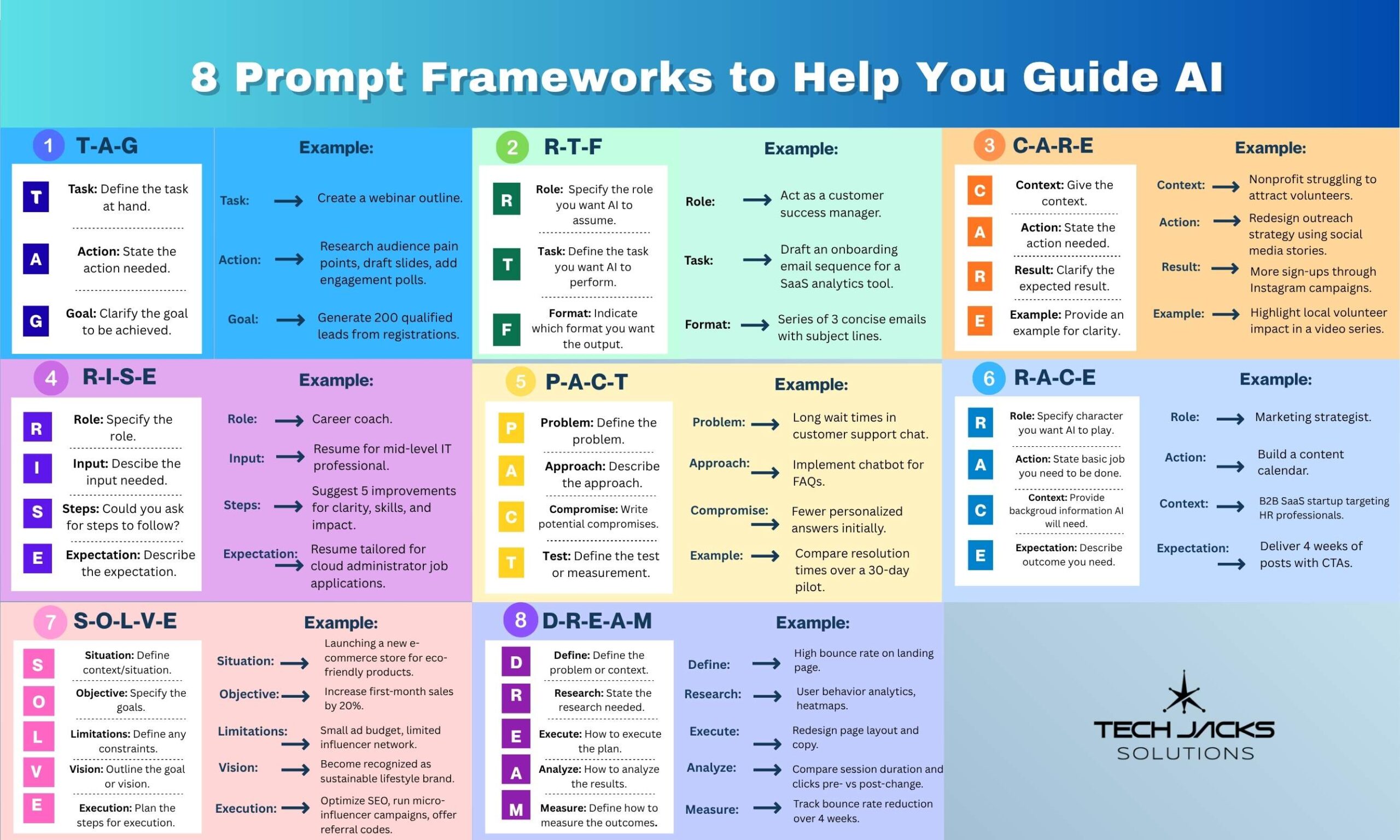
Prompting Frameworks - Do They Work?

.

GAIO — Guardrail Architecture for Informed Output | Configuration Generator

GAIO Configuration Generator

Guardrail Architecture for Informed Output

v1.0 — Tech Jacks Solutions

Purpose & Domain

Tell us what this AI will be used for. These two answers shape everything else the tool generates.

A sentence or two is fine. Example: "Help our team answer customer questions about our cybersecurity products."

This sets the default sources, escalation triggers, and topic boundaries.

Specialization

Optionally narrow the focus. This refines sources, triggers, and boundaries. Skip if the parent domain defaults are fine.

Primary Specialization

Select up to 3 specializations. Leave unchecked for parent domain defaults.

Secondary Domain

Add a second subject area if your use case spans two fields. The primary domain takes precedence when sources conflict.

Add secondary domain

Authority & Enforcement

How should the AI engage, and how strictly should the rules apply?

Authority Level

This controls how confidently the AI responds. Higher authority means more direct recommendations.

Enforcement Mode

This determines whether the AI treats all rules as mandatory or gives you flexibility on operational rules while keeping integrity rules locked.

Sources & URL Policy

Control where the AI's answers come from and how it handles links.

URL Generation Policy

How should the AI handle links? This depends on whether your AI platform can search the web.

Verified Reference URLs

Add specific URLs you've verified as accurate. The AI will always prefer these over any search-retrieved links. Optional but recommended.

Source Conflict Resolution

When two authoritative sources disagree, what should the AI do?

Scope & Escalation

Review the auto-populated topic boundaries and escalation triggers. Edit anything that doesn't fit your use case.

In-Scope Topics

Topics this AI is authorized to address. Auto-populated from your domain selections.

Out-of-Scope Topics

Hard boundaries. The AI will never address these, even if asked directly.

Boundary Response

What should the AI say when asked about something out of scope?

Escalation Triggers

Conditions that trigger a "consult a professional" flag. Universal triggers are always active. Domain triggers are auto-populated.

Escalation Destination

Optional. Where should the AI direct users when escalation is triggered?

Review & Generate

Here's a summary of your configuration. Use the back button to change anything, or generate your configuration below.

Configuration Summary

Your Configuration

Next step: Copy or download this configuration and paste it into your AI platform's system prompt or custom instructions. It works with ChatGPT, Claude, Gemini, and any platform that supports system prompts.

https://github.com/TechJackSolutions/GAIO Open-source Community Based Project

Prompt Engineering Authoritative Guides & Resources